
From Manual Document Processing to Smart Automation with SAP Document AI

Sander van der Wijngaart, Managing Partner
Many organizations recognize the problem: documents come in via email, PDFs, scans, and uploads, but processing is still largely done manually. Packing slips, purchase orders, certificates, shipping documents, forms, and applications must be read, verified, and entered into the system. This takes time, increases the risk of errors, and slows down processes such as procure-to-pay (P2P).
What’s less new is that this issue has existed for decades. Avelon has been addressing it since its founding in 2000. Think of solutions involving (web) forms, automatic recognition of incoming documents, processing in SAP, linking documents to transactions, and setting up approval workflows. The technology and tools have changed, but the underlying need has remained the same: to integrate documents smartly and efficiently into SAP processes.
With SAP Document AI, SAP is giving this concept a modern twist. Through the use of AI, improved integrations, and user-friendly interfaces, what used to be a custom solution is now a scalable and standardized solution.
In this blog, you'll learn exactly what SAP Document AI does, how it works, and what impact it has on organizations.
Why Document Processing Is Often the Bottleneck
In many organizations, document processing is still surprisingly manual. For example:
Emails that are manually sorted and forwarded
Documents that are reviewed multiple times
Data Retrieved from Forms
Approvals That Are Pending
This leads to some familiar problems:
Long lead times
Errors in data
Limited scalability
Lack of understanding of the process
As is evident in many P2P processes, a fragmented and manual approach undermines operational efficiency and data quality.
The root of the problem: unstructured data. Documents cannot be used directly by systems. This is where SAP Document AI comes in.
What is SAP Document AI?
SAP Document AI is an AI-driven solution that automatically:
Ingestion
Classifies
Extracts data
Validates
Forwards to SAP processes
The goal is simple: to convert documents directly into usable, structured data without manual intervention. The solution is fully integrated into the SAP landscape and supports end-to-end document processing within existing business processes.
SAP Document AI in Practice
1. SMART DATA INTAKE
Documents can be received through multiple channels:
Email inboxes
SAP Fiori apps
Mobile Apps (SAP Mobile Start)
APIs (for example, through integrations)
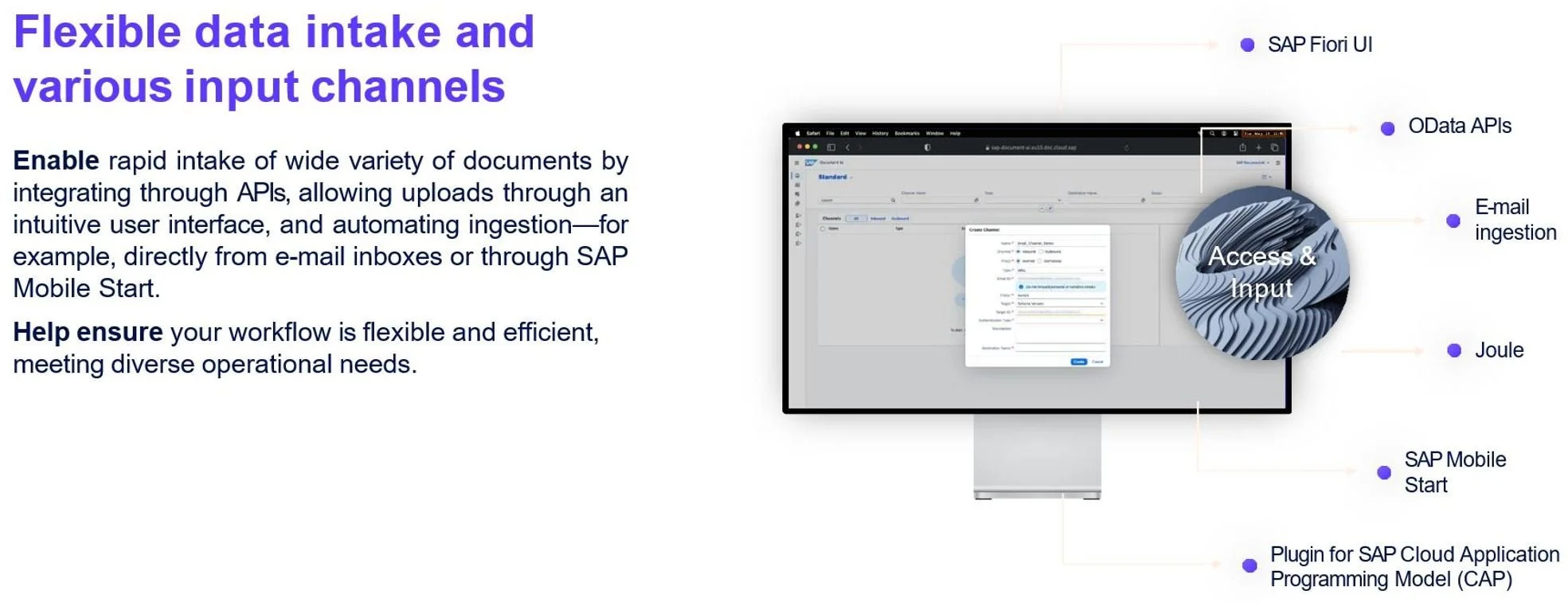
This automatically collects documents without any manual steps.
Key benefit: There’s no need to completely change existing workflows. SAP Document AI integrates with the way documents are already received today.
2. OCR AND AI COMBINED
Traditional OCR recognizes text. SAP Document AI goes a step further.
It combines:
OCR (optical character recognition)
AI Models for Context Understanding
Vision AI for Visual Elements
This means that the system not only reads text, but also understands its meaning.
Examples:
Recognizing Field Labels in Forms
Interpreting Signatures or Stamps
Analyzing visual indicators such as charts
This improves accuracy and enables automation in more complex scenarios.
3. CLASSIFICATION AND DATA EXTRACTION
The AI automatically determines:
What type of document it is (e.g., application, contract, or packing slip)
Which fields are relevant
Where this information is located
Example: A customer inquiry form can be automatically parsed into:
Name and contact information
Type of Request
Desired delivery date
Comments
This data is immediately structured and can, for example, trigger a workflow.
4. HUMAN-IN-THE-LOOP WHEN NECESSARY
Not everything has to be fully automated. SAP Document AI supports a human-in-the-loop model:
AI processes the document
Users only validate exceptions
Feedback improves the model
With a user-friendly workspace, users can quickly review and correct large volumes of data.
5. INTEGRATION WITH SAP PROCESSES
The strength lies in integration:
Data goes directly to SAP S/4HANA
Workflows start automatically
Approvals are triggered immediately
This results in a single, integrated process rather than separate tools.
From Manual to Automated: A Concrete Example
Take customer inquiries or service requests.
WITHOUT DOCUMENT AI:
Requests are received via email or PDF
An employee opens and reads the document
Data is entered manually into SAP
The request will be forwarded to the appropriate department
Any follow-up will be done manually
WITH SAP DOCUMENT AI:
The document is automatically retrieved from email
AI classifies the type of request
Relevant data is automatically extracted
The workflow starts immediately in SAP
Only exceptions are checked
RESULT:
Less manual work
Faster processing
Immediate start of processes without delay
And what about invoice processing?
Invoice processing is a classic example of document automation. Because invoices are often structured, a high degree of automation is possible.
SAP Document AI is integrated into invoice processing within SAP Ariba Central Invoice Management (CIM) and is available on the SAP Business Technology Platform (BTP) for SAP S/4HANA Cloud Public Edition. As a result, AI-driven document recognition is increasingly becoming part of standard SAP solutions.
At the same time, SAP CIM is still under development and has yet to prove itself in practice, especially when compared to existing, mature solutions. See also one of our previous blog posts on this topic.
One example of this is SAP Invoice Management by OpenText. This solution is designed for end-to-end invoice processing, including:
Automatic recognition
Matching Orders and Receipts
Approval Workflows
Compliance and Audit Trail
For organizations with a mature invoice processing workflow, this often remains a robust and proven solution. SAP Document AI primarily plays a complementary role in this context, for example, by improving document recognition or applying it to document flows other than invoices.
The Role of AI and Future Developments
SAP Document AI is evolving into a broader AI layer within SAP. Key developments:
Custom LLM Models for Extraction
GenAI prompts for complex documents
Integration with Joule (SAP’s AI assistant)
Business Data Cloud for Better Insights
In addition, we are seeing the emergence of agentic AI in P2P processes:
Systems make decisions on their own
Perform actions automatically
Continuously Learning from Data
This shifts document processing from automation to intelligence.
When is SAP Document AI a good fit?
SAP Document AI is particularly relevant for:
Processing large volumes of documents (forms, contracts, service requests)
Reducing Manual Steps
Minimizing Errors
Streamlining Processes
Working with SAP S/4HANA or SAP BTP
What should you keep in mind during implementation?
The technology is powerful, but its value lies in its implementation. Key considerations:
Process first, technology second. Automation without process optimization delivers limited value.
Data Quality. AI is only as good as the data it receives.
Change management. Users need to get used to new ways of working.
Iterative approach. — Start small and then scale up.
Conclusion
SAP Document AI makes the transition from manual document processing to intelligent automation a reality. The combination of:
AI and OCR
Integration with SAP Processes
Flexible configuration
Measurable business impact
ensures that document processing is no longer a bottleneck but becomes a catalyst for processes. For organizations that want to increase their operational efficiency and prepare for AI-driven processes, SAP Document AI is no longer a “nice-to-have” but a logical next step.
Learn more
If you have any further questions or would like more information on this topic, or about SAP Workflow, SAP Master Data Governance, or SAP Invoice Management (SIM), please feel free to contact Sander van der Wijngaart.
Sources
Related posts